Streak — Unlimited Access for Zerodha Users
Redesigning the product experience to simplify strategy and scanner creation through an intuitive and user-friendly interface across all platforms.

- Product
- Streak Unlimited Access
- Business model
- B2B2C
- Role
- Led the platform's design
- Platform
- Mobile app
- Team
- Product Manager · Engineering
- Outcome
- 8% less strategy abandonment · 10% more successful backtests
Launching Streak Unlimited Access
Objective
Streak is undergoing a transition to a new business model (B2B2C), necessitating the redesign of its algo-trading application for traders. The objective is to revamp user experiences to enhance usability, elevate trading efficiency, foster user engagement and integrate tailored features aligned with the B2B2C model.
Background
Streak is a simplified algo trading platform for traders that lets you create and test your strategies in live markets. It also allows you to create and run scans across equities, futures, and options using technical indicators and math operators.
Algorithmic trading provides a more systematic approach to active trading than one based on intuition or instinct.
My Role
My role at Streak Unlimited Access involved spearheading the platform's design, where I led the ideation process, facilitated collaboration between design and development teams, and ensured alignment with user needs.
By prioritizing user-centric design principles, we achieved significant improvements in user satisfaction and engagement, ultimately delivering a platform that met and exceeded expectations.
Design Process
At Streak, we embrace Lean UX principles, fostering collaborative development and rapid user testing for iterative improvements. Our focus on a Minimum Viable Product (MVP) approach ensures adaptability and continuous enhancement to meet evolving user needs.
Why Research?
The research for the Streak application redesign was conducted to pinpoint improvement opportunities within the current app, address existing pain points experienced by users and uncover the specific needs and challenges faced by traders of varying experience levels.
User Research
In tandem with engaging in competitive and market research, I collaborated closely with the support team to identify issues that traders were encountering with our application. Through this collaboration, I conducted brief interviews with users to gain firsthand insights into their experiences. These interviews not only provided a deeper understanding of the challenges users were facing but also offered valuable ideas for enhancing the user journey and simplifying task completion.
Research Insights & Findings
From insightful interviews, we extracted valuable user insights, uncovering their preferences and pain points. These insights drive design choices, resulting in solutions that meet user needs and enhance overall experience.
- 01
Strategy Creation Challenges
New users face challenges in creating strategies, citing a lack of precision and a complex process.
- 02
Simplifying User Experience
Users highlight platform complexity, emphasizing the need for a simpler interface and enhanced usability for better satisfaction.
- 03
Onboarding Improvement Opportunity
Streamlining initial steps and providing intuitive guidance can enhance onboarding experience and user retention.
- 04
Sentence Format Preference
Users prefer sentence-format conditions for strategy creation, finding them more intuitive and accessible.
Problem and Hypothesis
1Traders are facing challenges in crafting strategies and scanners because the current condition-writing process is unfamiliar and causing confusion.
1We hypothesize that providing traders with sentence writing format to express conditions will lead to increased adoption and an overall enhancement of the user experience.
2Traders, particularly those who are new to our trading platform face a significant challenge due to the complexity and abundance of information in the current strategy creation process.
2A simplified strategy creation process is expected to reduce friction, attracting more users to utilize this feature regularly and enhancing the overall usability and satisfaction of our platform.
Ideation and App Blueprinting
Storyboard
The storyboard showcases a user's journey with Streak Unlimited Access. It starts with excitement from a promotional video, followed by a smooth download and login process. The user finds the onboarding helpful and explores features with intrigue. Using the intuitive interface, they create and deploy a strategy confidently. Prompted by a notification, they execute a trade seamlessly, feeling relieved and satisfied.
 Panel 1
Watch a Streak Unlimited Access Launch Video
Trader watches a promotional video showcasing the features of Streak Unlimited Access.
Happy · Excited
 Panel 2
Download and Login
Trader downloads the app from the App Store and logs in with their Kite account.
Satisfied · Relieved
 Panel 3
Onboarding and Exploring App Features
Trader completes onboarding and explores intuitive strategy creation tools and pre-built templates etc.
Intrigued · Curious
 Panel 4
Creating and Deploying the Strategy
Trader effortlessly creates and deploys a strategy using the new and intuitive interface.
Confident · Empowered
 Panel 5
Notification
Trader receives a notification while relaxing in the living room, alerting them to a potential trade opportunity.
Alert · Attentive
 Panel 6
Execute the Trade
Trader reviews the trade notification, confirms the details, and executes the trade.
Relieved · Satisfied
App Structure
Building upon insights from the current streak app, I generated ideas to shape the site map for the app, outlining the overall structure and key user flows. The site map depicts all major tasks users will undergo, including creating a scanner, creating a strategy, and deployment with notifications. This framework guides design decisions and ensures alignment with user insights collected thus far.
- Orderbook
- Positions
- Deployed
- Discover Strategies
- Discover Scanners
- Position
- Entry
- Exit
- Backtest Paramts
- Run Backtest
- Edit
- Share
- List of stocks
- Deploy
- Select Stocks
- Virtual deployment
- Scan on
- Chart type
- Add Condition
- Run Scan
- Edit
- Search
- Share
- List Of Stocks
- My Scanners
- Discover Scanners
- Search
- Filter/Sort
- Search
- Filter/Sort
- List of scanners
- Edit
- Search
- Share
- List of Stocks
- My Strategies
- Discover Strategies
- Search
- Filter/Sort
- Search
- Filter/Sort
- List of Strategies
- Edit
- Share
- List of stocks
- Deploy
- Select Stocks
- Virtual Deployment
- My profile
- Positions
- Orders
- Deployed
- Notifications
- Log out
- Open orders
- Executed orders
- Waiting
- Entered
- Stopped
- Scanner Notifications
- Paper trade
- Scanner Notifications
- Paper Trade Notifications
Addressing User Problems
Streamlined Condition Writing Process
Recognizing the complexity of the current condition-writing process, we implemented a sentence-based condition format. This approach not only made it easier for traders to express their conditions but also significantly improved the clarity and precision of strategy creation. By simplifying the process, we aimed to reduce friction and empower traders to create strategies more efficiently.
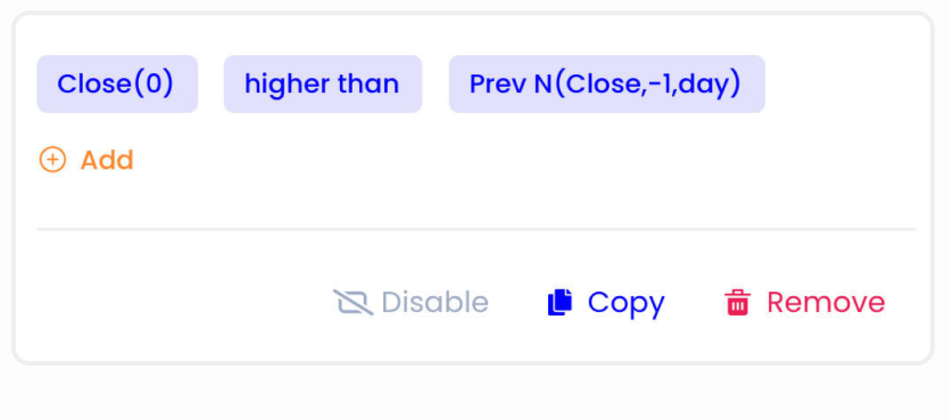
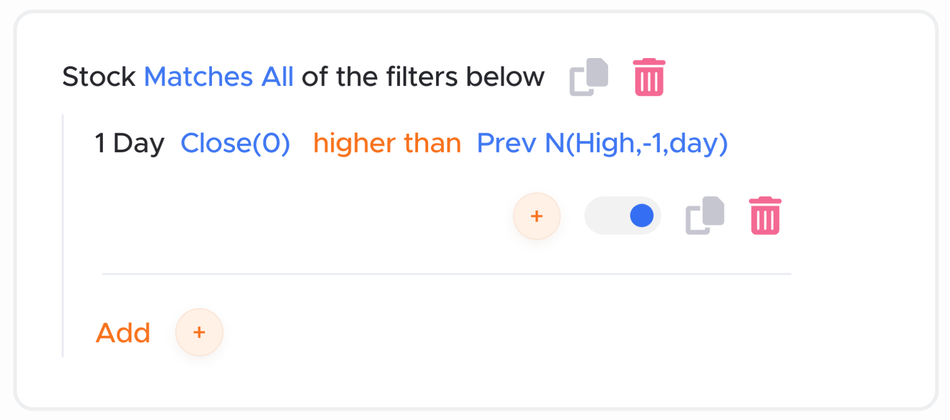
Users found it easier to understand and express trading conditions, leading to increased clarity and understanding.
Motivation lever · Enhanced Clarity and Understanding (Increased)Users felt more confident and skilled in crafting strategies, contributing to a sense of mastery over the platform.
Ability lever · Enhanced User Mastery (Increased)
A New Approach in Action
Improving Strategy
In response to feedback highlighting platform complexity, we undertook a thorough redesign of the strategy creation interface, we segmented the create page into sections (positions, entry, exit, and backtest parameters) and reorganized input data fields.
- Position
- Entry
- Exit
- Backtest Paramts.
- Buy/Sell
- Instruments
- Chart
- Time Frame
- Holding Type
- Quantity
- Entry Conditions
- Entry Start Time
- Entry Stop Time
- SL/TP
- Exit Conditions
- Trailing SL
- TPSL Type
- Initial Capital
- Daily Strategy Cycle
- Start / Stop Date
Users reported higher satisfaction levels with the strategy creation process, leading to a more enjoyable experience.
Motivation lever · Increased User Satisfaction (Increased)The streamlined process reduced complexity and made it easier for users to navigate through strategy creation steps.
Ability lever · Streamlined Process (Increased)
Enhanced Onboarding
Imagine diving into algo trading as a beginner—it's like jumping into a pool without knowing how to swim. But don't worry! Pre-built scanners and strategies are like reliable floaties to help you navigate the world of trading.
These ready-made tools simplify the onboarding process for beginners by eliminating the need to create strategies and scanners from scratch. They make algo trading more accessible, turning what could be a daunting learning curve into a manageable experience.
So, if you're looking for algo trading made simple, these tools have got your back, making everything much easier and less overwhelming.
Users felt more confident in their trading abilities, leading to increased engagement and willingness to explore advanced features.
Motivation lever · Empowered User Confidence (Increased)The minimized learning curve made it easier for new users to get started with the platform, resulting in faster onboarding and adoption rates.
Ability lever · Reduced Pain of Learning Curve (Increased)
UI and Interaction Design
My approach was centered on creating intuitive interfaces that resonate with users, ensuring a smooth navigation experience. I implemented design principles that not only enhanced the overall aesthetics but also prioritized user engagement and functionality. By collaborating with cross-functional teams, I successfully translated user requirements into captivating and user-friendly mobile app interfaces, ultimately contributing to the success of the projects.
Home Screen
Separate Home Screens for users based on their login status provide tailored experiences for different user groups.
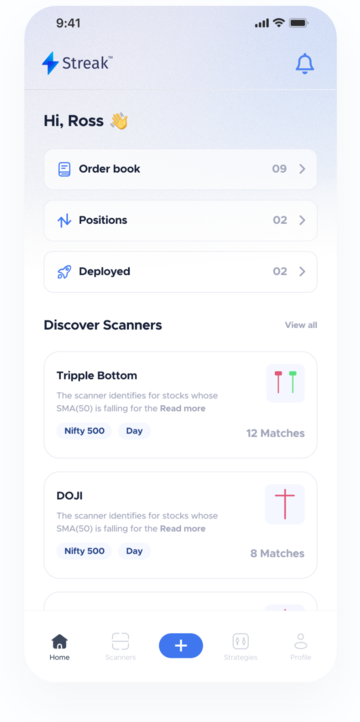 Logged in
Incorporating quick links like Order Book, Positions, and Deployed simplifies user navigation.
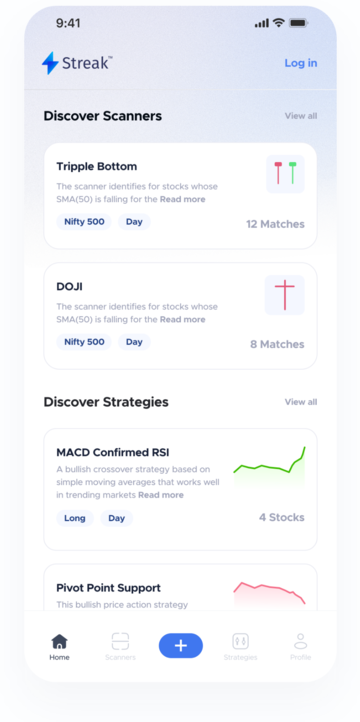 Logged out
Logging in through your broker enables you to place orders, deploy strategies, and access other features.
Discover Scanners and Strategies
Discover a collection of over 250+ pre-built scanners and 150+ pre-built strategies.
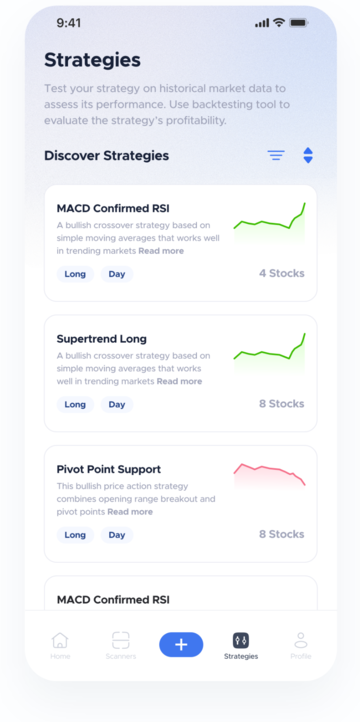 Discover Strategies
A collection of over 150+ pre-built strategies for equities, futures and options.
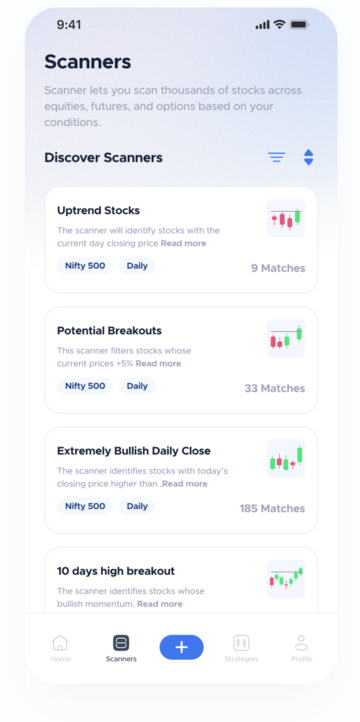 Discover Scanners
A collection of over 250+ pre-built scanners that are based on technical indicators.
Create Strategy
Create your own customised strategies by keying in Entry conditions, Exit conditions and additional parameters such as chart type, holding type etc.
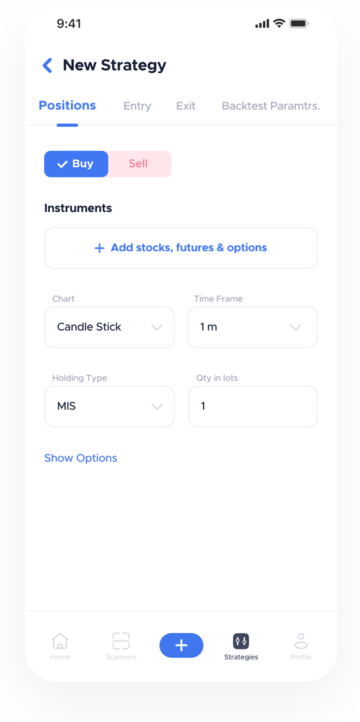 Default Strategy State
Add Instruments, Choose chart, timeframe etc
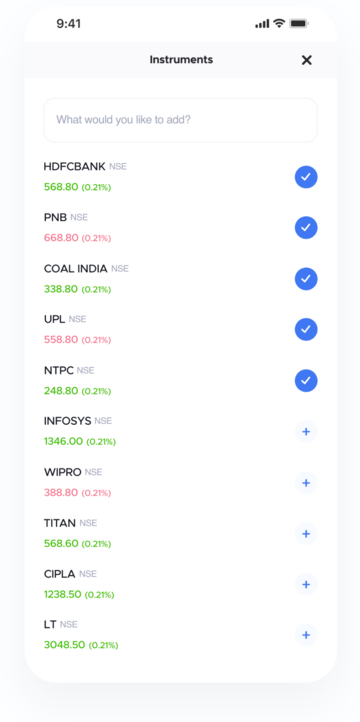 Add Instruments
Select stock, commodity, or currency futures from NSE.
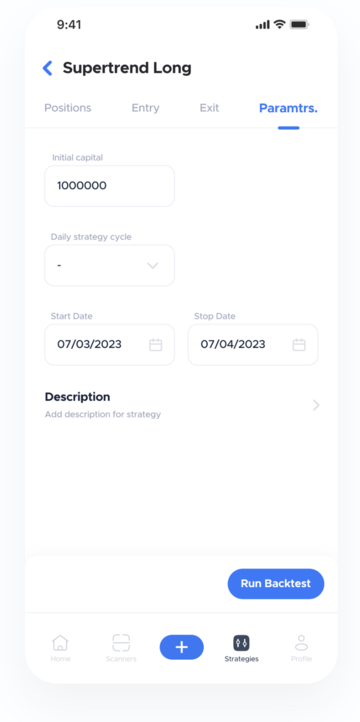 Backtest Parameters
Change the backtesting parameters as per your requirement
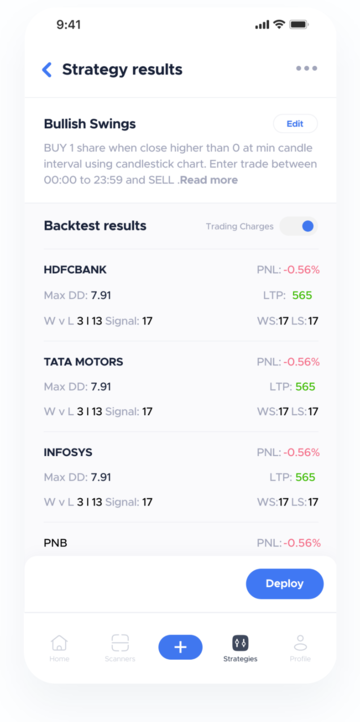 Backtest Results
Look at stats such as number of trades wins, losses, gains
Create Scanner
Create and run scans across equities, futures, and options using technical indicators and math operators.
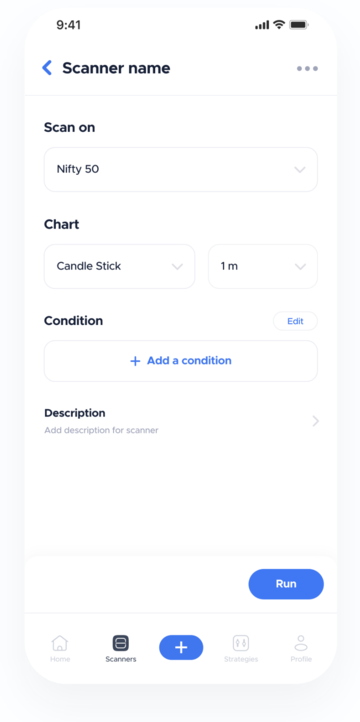 Default Scanner State
Choose Index, Chart & Timeframe
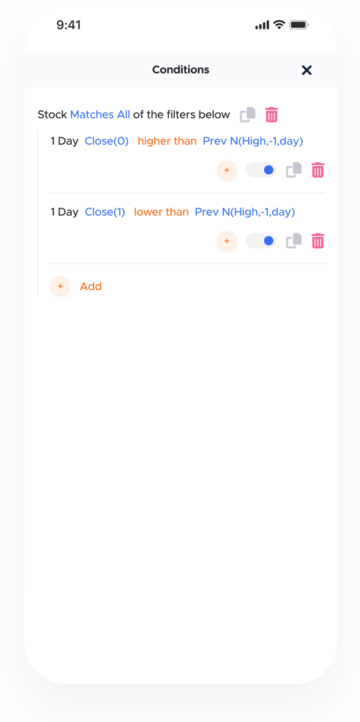 Writing Condition
Add indicators, operators and functions
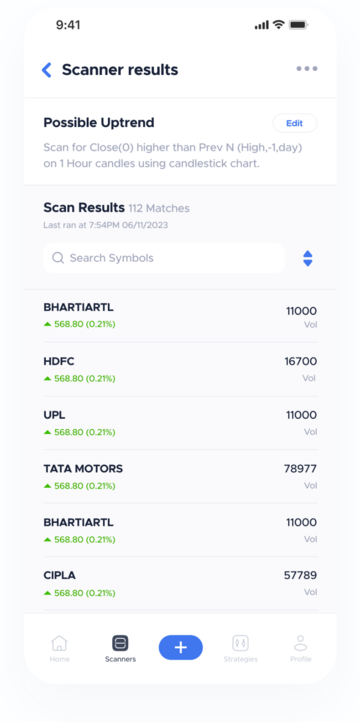 Scan Results
Search stocks or edit scanner
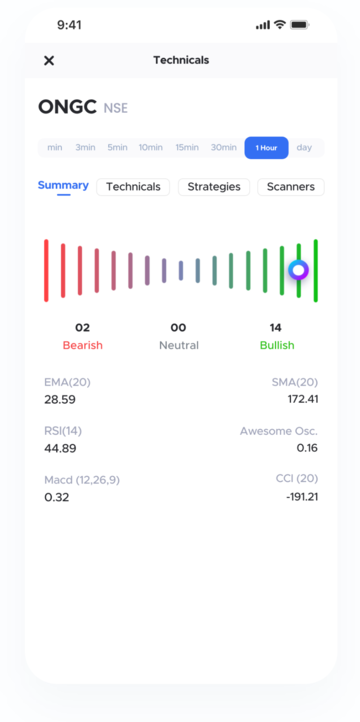 Technicals
Check stock-specific technicals
Virtual Deployment
Get a sense of how a particular strategy performs in live markets by deploying it virtually. No actual orders are placed in virtual deployment.
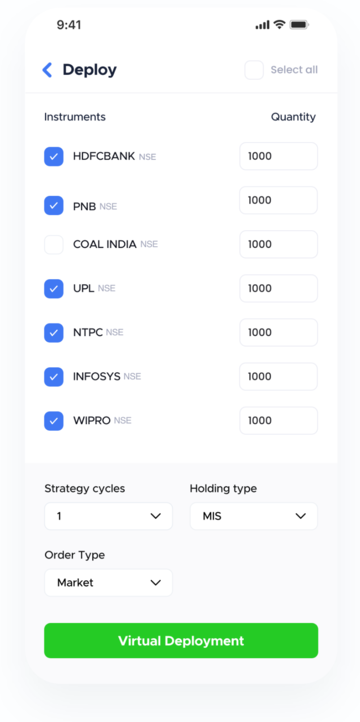 Virtual Deployment
Select stocks and quantity you want to deploy
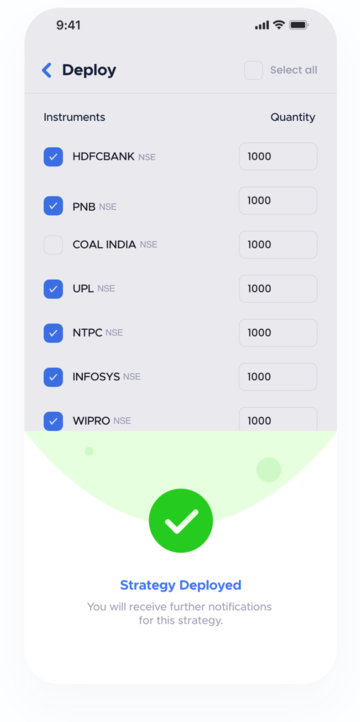 Strategy Deployed
Success pop up, when your strategy has been successfully deployed
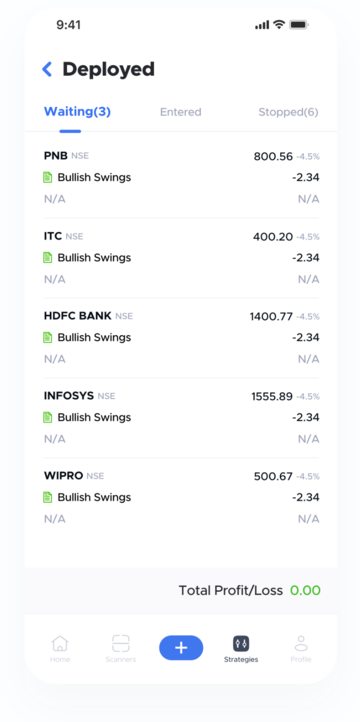 Deployed Section
All strategies whether in waiting, entry or stopped will appear here.
Interaction for scanner
Create and run scans across equities, futures, and options using technical indicators and math operators.
After running the scan, you can quickly check the stock-specific technical summary and charts by clicking on technicals.
Interaction for strategy
Swipe animation for the create strategy page, reduces taps and helps users make quick transitions through pages.
Virtual Deployment
Get a sense of how a particular strategy performs in live markets.
Hypothesis Evaluation
To evaluate our hypothesis we test the MVP with our users to check if it approves or disapproves our hypothesis.
We hypothesize that providing traders with sentence writing format to express conditions will lead to increased adoption, streamlined strategy implementation, and an overall enhancement of the user experience.
It is easy for users to understand and create their own conditions using the sentence-writing condition; so, a new format for condition writing should be employed.
| Evidence | Credibility | The user found it easy to do. | The user found it challenging to use |
|---|---|---|---|
| User create new condition | High | Consistent | Inconsistent |
| User edit and delete condition | High | Very Consistent | Inconsistent |
| Backtest Strategy Successfully | Medium | Consistent | Inconsistent |
| Run Scanner Successfully | Medium | Consistent | Inconsistent |
| User couldn't complete the condition | High | Inconsistent | Consistent |
| Total | 5 | 1 |
- Conclusion
- User found the sentence format for condition writing very easy to use.
- Approves Hypothesis
- It is easy for users to understand and create their own conditions using the sentence-writing format; so, a new format for condition writing should be employed.
- Design Implication
- Design a new format for condition writing by using sentence format.
Achievements & User Feedbacks
- 8%
- Reduction in strategy abandonment
- 10%
- Increase in successful backtest completion
User Testimonials
Feedback collected from Z Connect, app stores, and other trading communities raving about the new app's seamless experience and its ability to streamline strategy creation and enhance trading outcomes.
“Just started to try, I find creating strategy is so simple and in understandable way.”
“Streak app is absolutely stunning! The new interface is even simpler. I think writing conditions for strategies and scanner have become very easy. Good Job!”
“Happy using the app, it is very helpful and has simple user interface.”
Product Launch
Design Assurance and Key Learnings
Validating Designs
Usability testing sessions were conducted to validate our designs and gather feedback from users. The results showed a significant improvement in user experience, particularly in creating strategies and editing conditions. Incorporating feedback from users, we iteratively refined our designs to further enhance usability and functionality.
Key Takeaways
I worked with stakeholders and tech team to create and implement these designs. I believe that our iterations were successful, as we achieved our goal of making strategy and scanner creation process simple and short for traders. Working with the diverse team was a great experience and I was glad to have an opportunity to work on another SaaS product of streak.